← Features  /  Bookings & Scheduling
Bookings & Scheduling

Scheduling that's already talking to your CRM

wpOps gives you a public booking page per Event Type, with real availability and double-booking protection and two-way Google Calendar sync — and every booking lands tied to the right Contact or Company automatically, not sitting in a separate scheduling tool.

Request demo access
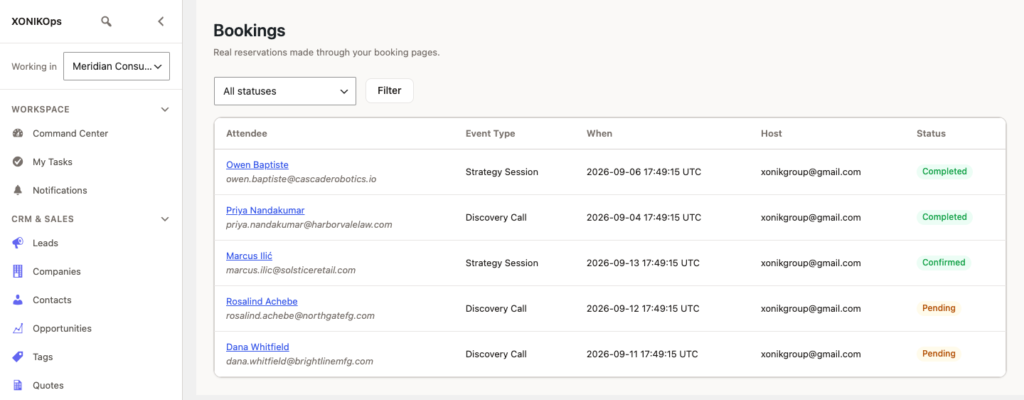
The Bookings list — attendee, host, status, and the calendar sync state.

What it does today

The real mechanics a scheduling tool needs, built in rather than integrated after the fact.

Public booking pages per Event Typebookings.event_type
A 30-minute discovery call, an onsite consultation, whatever your team offers — each with its own duration, location, and host.
Real availability & conflict protectionbookings.availability
Double-booking protection is enforced per host automatically, not left to whoever checks the calendar first.
Two-way Google Calendar syncbookings.calendar_sync
Reschedule on either side and the other follows — disclosed honestly as Google Calendar only today.
Tied to the right CRM recordbookings.crm_link
Every booking links back to its Contact or Company automatically — no manual matching after the fact.
How it fits your process

Three steps, from first setup to the booking landing where you can see it.

01

Create an Event Type

Set duration, location, and host — wpOps gives you a public link to share.

02

Share the link

Email signature, website, or a campaign — anywhere you'd normally point to a scheduling tool.

03

Bookings land tied to the right record

Attendee, host, and status all visible in one operational list.

One less subscription

Scheduling tools are usually the easiest tool to forget you're paying for separately every month.

Separate scheduling subscriptionNot needed
Tied to your own CRM dataAutomatically
Runs on your own domainYes

Frequently asked

Does it sync with calendars other than Google?

Not yet — two-way sync is Google Calendar only today, disclosed plainly rather than implied to work with anything.

Can I prevent double-bookings across multiple hosts?

Yes — availability and conflict protection are enforced per host automatically.

Is the booking page branded to my agency?

It runs on your own WordPress install, so it's already on your own domain, not a third-party booking-tool subdomain.

See Bookings & Scheduling on a real installation, not a slide deck.

Request demo access