← Features  /  Projects & Tasks
Projects & Tasks

Delivery tracking that matches how the work actually gets approved

wpOps tracks internal delivery work on a real kanban board, with Tasks that move through an actual review lifecycle — accepted, started, submitted, approved — not just status labels on a to-do list, and comments scoped to who should actually see them.

Request demo access
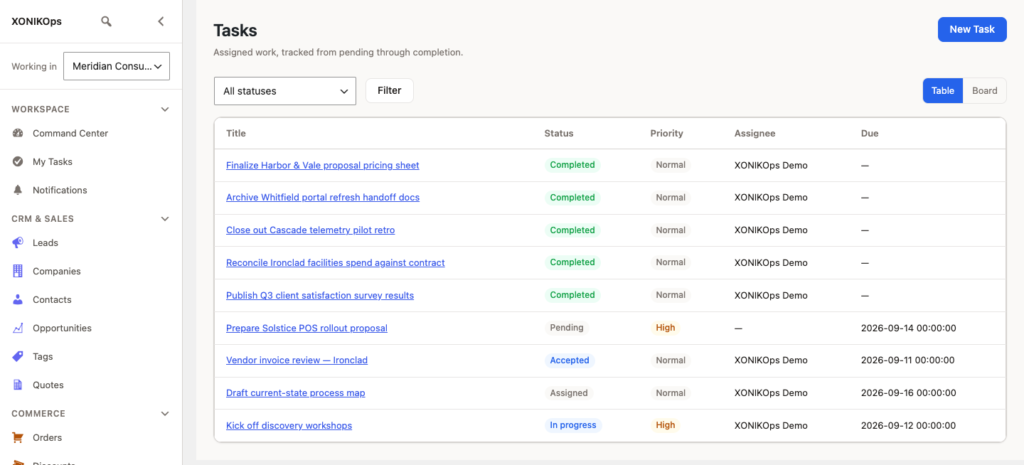
The Tasks list — status, priority, and due date for every assigned task.

What it does today

Built for real delivery work, not a generic to-do list repurposed for it.

Kanban board, drag-and-droptasks.board
A Table or Board view of Tasks — dragging a card between columns changes its real status, the same as clicking the status button.
A real review lifecycletasks.lifecycle
Accept, start work, submit for review, and a reviewer can approve or request revision — not a self-reported checkbox.
Checklists and Files per Tasktasks.checklist
Add checklist items (some markable as required before completion) and attach Files directly to the Task.
Scoped comment visibilitytasks.comments
Comments can be internal-only, client-visible, or vendor-visible, on the same thread.

How it fits delivery

Three steps, whether it's one Project or ten running at once.

01

Create a Project

Name it, set an owner, and start dates — description and target completion are optional.

02

Assign and track Tasks through review

Each Task carries its own priority, due date, and checklist as it moves.

03

Close out with a completed board

A completed Task can be reopened later if the work needs revisiting.

Who sees what, by design

A real differentiator most task tools don't have: comment visibility scoped per audience, not one shared thread everyone sees.

Internal-only commentsSupported
Client-visible commentsSupported
Vendor-visible commentsSupported

Frequently asked

Is the board just a kanban view, or does status actually change?

Real status — dragging a card changes the Task's actual status, the same as clicking the status button.

Can a task require sign-off before it's marked done?

Yes — a reviewer can approve or request revision before a task moves to complete; it's not a self-reported checkbox.

Can clients see task comments?

Only the ones marked visible to them — comments can be internal-only, client-visible, or vendor-visible, on the same thread.

See Projects & Tasks on a real installation, not a slide deck.

Request demo access